Layer 1: Signal
Raw output from the hardware.
Accelerometer samples. GPS fixes. Which Wi-Fi networks are in range.
What My Phone Knows is a free Android app. It finds the trackers inside the apps on your phone and tells you what each one can reach. The readout here filled itself in the second this page opened, with no prompt and nothing to agree to. The app goes a good deal further.
Android first. Not on Google Play yet, and this page will say so until it is.
Or go watch an ad and see how your data shapes itRead from this browser, just now
This list stayed in your browser. It was read on the page, shown to you, and forgotten when you close the tab. The ads at the bottom of the page are a different story, and they say what they send.
6lines read from this browser with no prompt
The prompt you remember agreeing to isn’t where most of this happens. A permission covers the things a phone treats as dangerous: your camera, your microphone, your exact location. Everything in the list above sits outside that, because on its own each line describes millions of people.
Put six of them side by side and the group gets small fast, and it stays the same group every time you come back. That’s the part that does the recognizing, and no dialog is involved in it.
Each rung is worked out from the one below it. Climbing gets more specific about you, and it happens by arithmetic, not by anyone asking again.
Raw output from the hardware.
Accelerometer samples. GPS fixes. Which Wi-Fi networks are in range.
Things the operating system noticed happening, with a time on them.
Screen on at 6:14. App opened. Photo saved. Charger plugged in.
A typed value someone chose to write down.
Steps: 8,412. Weight: 184.2 lb at 07:03.
The same records, added up over time.
Asleep 11:40pm to 6:15am. Nine hours at the same place every weekday.
A stable fact about you, not about the phone.
Where you live. Where you work. Roughly what you earn. Who else lives there.
A guess about you, with a confidence attached and no way to check it.
Likely a new parent. Likely shopping for a car. Likely training for something.
What gets done with the guess.
Which ads you get. Which price you see. Which list you end up on.
The line that matters. Everything up to Pattern describes a device. From Trait upward it describes a person. You consent down at Record and get characterised up at Inference, and nothing in between ever shows you a dialog.
It opens the code inside each app in your launcher and looks for app trackers it recognizes. Every one it finds gets the same four beats, because a scanner that stops at naming the tracker has told you a fact you can’t use.
01
What is in there, counted plainly. “Google Play Store contains 2 tracking libraries from 1 company.” No adjectives.
02
The ladder above, drawn only as far as those libraries ordinarily climb. A crash reporter stops at Event, and the card says so instead of reaching for the top rung.
03
Why this is allowed and what gives you a lever. It’s being written properly from coursework, with sources. Until then the app leaves the space empty and says why, because an app that invents a statute is worse than one that stays quiet.
04
The one setting that actually changes something, and a button that opens it. Where nothing would change, it says that too.
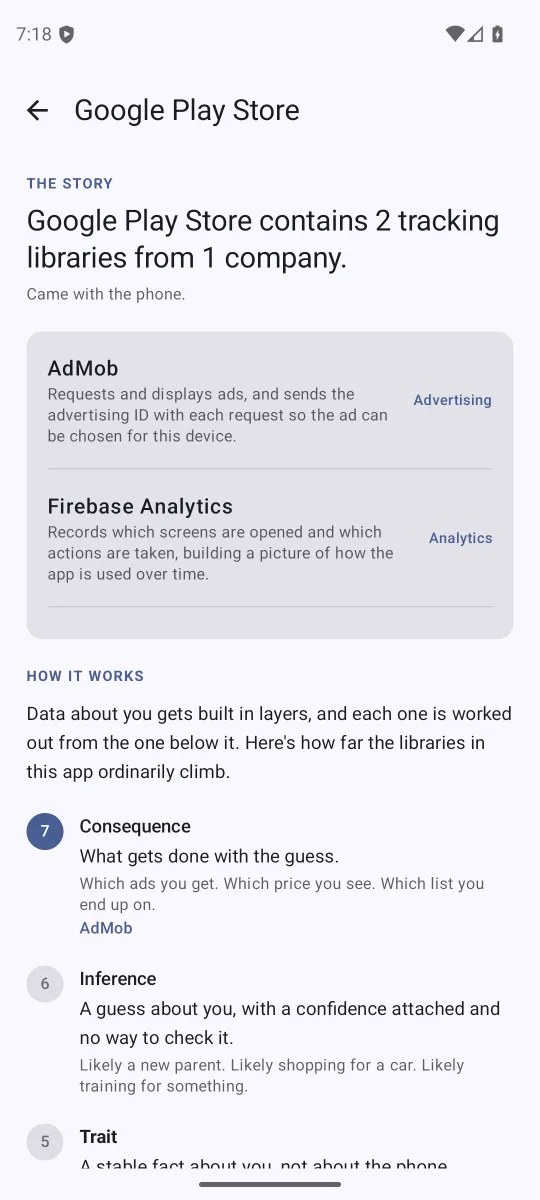
Matched against 405 known app trackers, bundled in the app and refreshed when the app updates. A tracker being present means its code is in there. It doesn’t prove it ran, and the app doesn’t claim otherwise.
Your Data Rights is a plain English course on what companies collect and what you can do about it. Its first module ends by asking you to reset your advertising ID and run the test yourself. This is that test. The course covers the law and the history, this shows you the phone in your hand, and both are free.
See what the course coversThe course is being written now, so it is on the same schedule as the app.
One email when it lands on Google Play. Nothing else, ever.
Email me at launchThe course this pairs with covers what the law says, which is the half an app can’t show you.
See what the course coversFair enough. Scroll back up and read the six lines this page got without asking. That was the whole argument.
Back to the topA good personalized ad is useful. It’s how plenty of people find things they end up loving. It works because your browser hands the ad server a few facts every time it asks for an ad.
Here are those facts with your values in them, and the published audience segments each one can feed.
What this can’t show you is why you got the ad you got. Google doesn’t tell the site that, and nobody else in the chain does either. So these are segments a signal can support, from lists anyone can look up. It’s not a claim about which ones you’re in.
What your browser sends with the request
Supports segments like
Google can use everything above, plus whatever history its cookies tie to you if you’ve allowed that.
Same kind of slot, asked for without your history. Google says these still use the page you’re on and your rough location, just not your past behavior.
We own this one, so it shows up no matter who you are. It knows nothing about you, which also makes it the most biased ad on the page.
Data to AI
How AI works, from the ground up. Five-minute lessons that start with the data you make every day.
See the courseCourse pageGoogle and Meta both let you see the interests they have on file for you, and change them. That’s the half this page can’t show you.
Works signed in or out.
Needs a Facebook or Instagram login.